







Photo credit: Canva
Understanding Your CPA PEP Exam Results
Receiving your CPA Professional Education Program (CPA PEP) module exam results can be stressful—especially if you're unsure how to interpret them. This post outlines key elements of your transcript to help you better understand your performance.
Where to Find Your Results
On the CPAWSB module results release date, log in to My CPA portal to view your overall exam results. You can access and download a copy of your exam result transcript in a PDF format through the CPA Canada National Candidate Portal.
What Your CPA PEP Exam Transcript Includes
The transcript provides an outline of your overall result, including your performance results on the:
- Objective Format Questions
- Case Portion of the Examination
Understanding Your Overall Result Rating
You will receive one of the following four ratings for your Overall Result:
- Pass with Distinction – Identifies top-performing writers for that specific examination.
- Pass – Identifies a group of writers who met the passing standard required, based on a combination of the Objective Format Questions and the Case Question(s), for that specific examination.
- Marginal Pass – Identifies a group of writers who just barely met the passing standard for that specific examination.
- Fail – Candidates who did not meet the passing standard set by the Board of Examiners for that specific examination.
Sample CPA Exam Results Transcript
The following figure is a sample CPA PEP exam results transcript. It includes helpful explanations of each component to help you understand the transcript.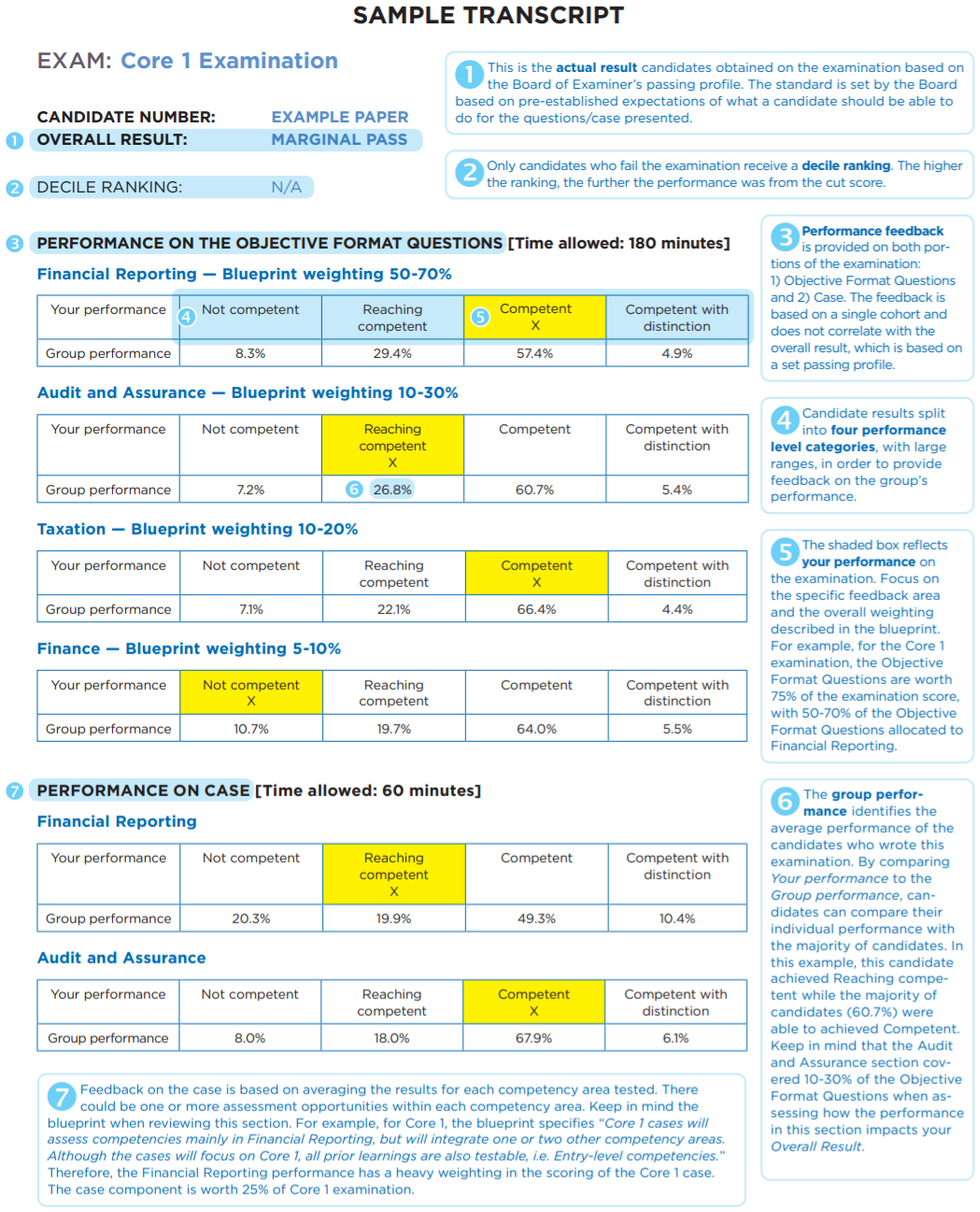
Figure: CPA PEP Core and Elective Examination Results FAQs, page 5 (CPA Canada)
Decile Ranking for Failed Attempts
If you receive a Fail rating, your transcript will include a decile ranking. A higher decile ranking indicates you were further away from meeting the passing profile. The decile ranking compares the candidate’s performance to other unsuccessful candidates for that specific examination. Note that the Fail category does not distinguish between a marginal and a significant fail rating. Thus, this will make it difficult to compare the transcripts of marginal passes and fails.
What to Do If You Receive a Fail or Marginally Pass
Review your performance in both the objective format and case portions, as well as specific competency areas. It is recommended to focus on improving weaker areas before your next CPA PEP examination attempt.
Additional Resources
For more information about how to interpret the CPA PEP exam transcript, refer to the CPA PEP Core and Elective Examination Results FAQ. Pages 1 to 4 of this document provides additional insight on the structure of the CPA PEP exam transcript and answers commonly asked questions provided by candidates. Once examination results are released, the Board of Examiners will also issue their general comments on candidates’ performance on each CPA PEP exam offered. You can access these comments (in PDF format) through the Brightspace (D2L) platform.
CPA PEP Exams Are Non-Disclosed
All CPA PEP examinations and materials are non-disclosed. This is acknowledged by CPAWSB candidates within the Training Contract. This means you will not be able to access your exam responses. All exam materials and responses are maintained by CPA Canada and are not shared with external parties, including the CPA Western School of Business. If you are a CPAWSB candidate and have any additional questions about how to interpret your CPA PEP Exam result transcript, please reach out to the CPAWSB Learner Support team. Feel free to request to speak to a CPAWSB Academic Advisor by filling out the following CPAWSB Learner Support Intake Form—we’re always happy to help.

About the Author
Mandeep Bains, CPA, CA, is the Manager, Learner Support at CPAWSB. He advises candidates throughout their CPA PEP journey, helping them navigate challenges and build confidence. Mandeep draws on his experience as a CPA and professional education leader to offer practical, grounded advice tailored to each learner’s needs.